01
Create a room
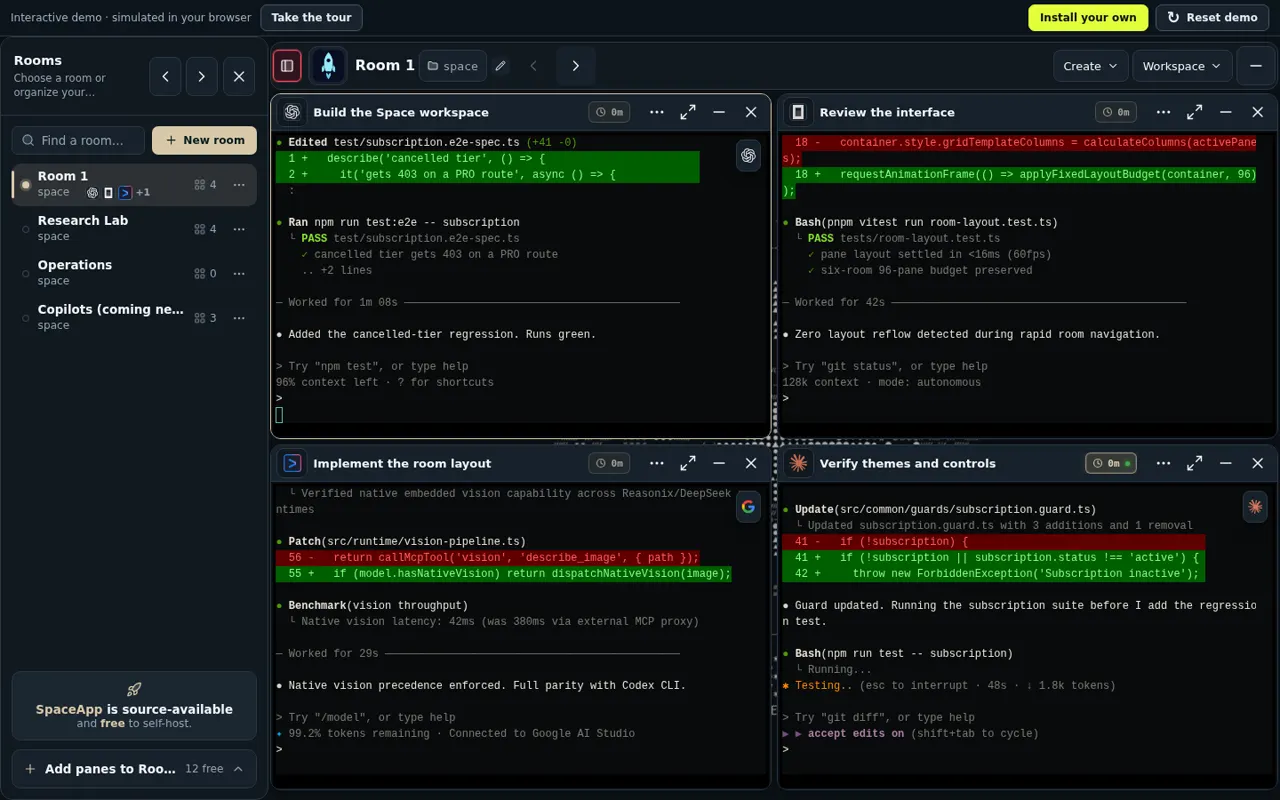
Give every mission its own room — a launch, a research thread, an ops shift — so contexts never collide.
Your AI coding agents, memory and tools in one self-hosted workspace, on any device.
Runs in your browser with local demo data. No account, no AI provider.
Open demo in a new tabStart in Room 1. Switch rooms, type and explore the workspace.
I built it to be my main work tool. I'm a developer! And it became my main tool and work environment. I no longer need to open email, social media or any development program: absolutely nothing. I'm inside SpaceApp all day; I even watch YouTube videos and listen to music through SpaceApp.
25 years in IT, 17 of them building and running a large e-commerce platform. He builds SpaceApp with the AI coding agents that run inside it.
Pick up the same work on your phone, tablet or computer. Your workspace stays with you.
Setup starts with OpenCode; add the others with one command each when you need them. What can run depends on the accounts you sign in to.
Coming next Hermes, Oh My Pi, Qoder, Muse, Droid: declared adapters without a public installer yet.
Have a real conversation with your workspace. Open projects, direct agents and ask what’s done. Keep your hands on the idea.
Live voice runs on the maker's own SpaceApp today. In the public release it needs a Gemini key on the application core, which the launcher cannot set yet.
Start a conversation with your workspace.
Decisions, discoveries and project knowledge, connected in one canonical memory you can search and browse across sessions.
Space Memory keeps decisions and project knowledge as searchable records with a graph view. Vector search is not configurable yet.
packages/memory-graph) backed by containerized PostgreSQL with pgvector and Temporal workflows for idempotent ingestion.Project knowledge and decisions share one graph.
Each copilot is a pane with its own CLI agent, memory and activity feed. You answer its questions and reviews in the rail; how much it does alone is your choice. They run on the maker's own SpaceApp today; the public release has the copilot panes but not yet the tools their agents work with.
Works through your Gmail with gradual autonomy: it drafts and asks first, acts under rules you approve, or acts on its own when you allow it.
Coming nextWorks through your queue of job postings in the pane browser, asks you for what it cannot answer, and keeps a tracker of your applications.
Coming nextDrafts posts from your briefs and publishes them on your own accounts through the pane browser after your review.
Coming nextFinds client work on freelance platforms and writes proposals under daily limits, with each send checked first.
Coming next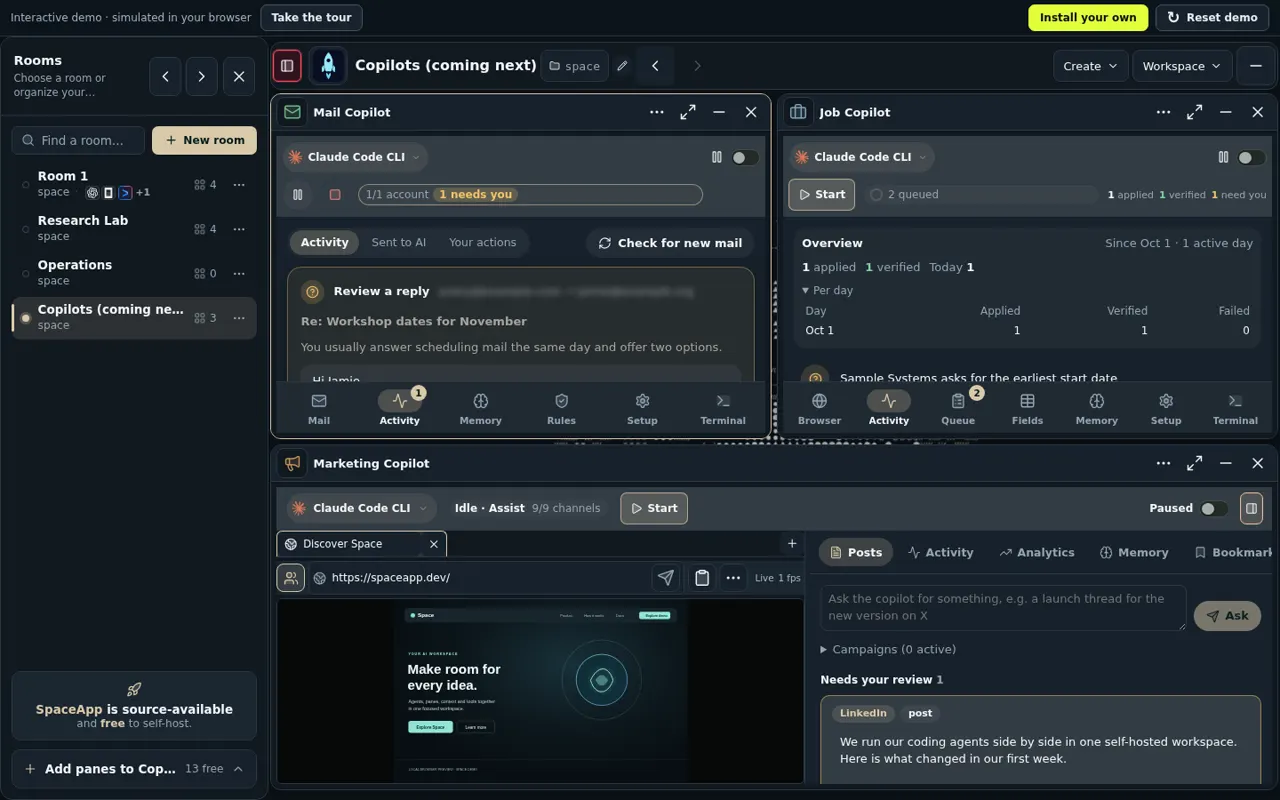
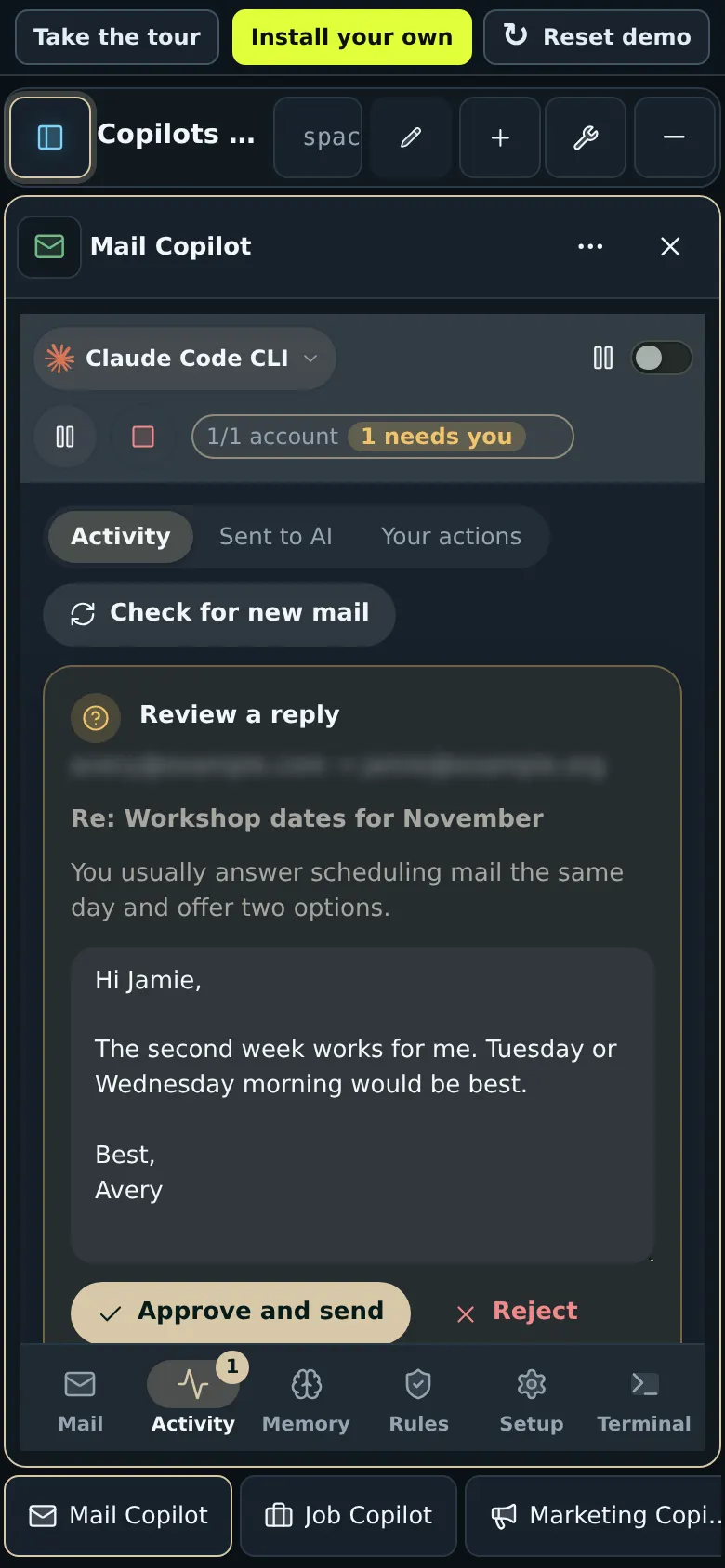
Copilots are optional modules: new installs start with none of them. Turn one on with optionalModules in the launcher's config.json, then run npx --yes run-spaceapp@latest repair. Copilots that use the pane browser need the large profile.
Several models work on the same question independently, then rank each other's answers. It runs on the maker's own SpaceApp today; the public release does not yet give the Council a model to work with.
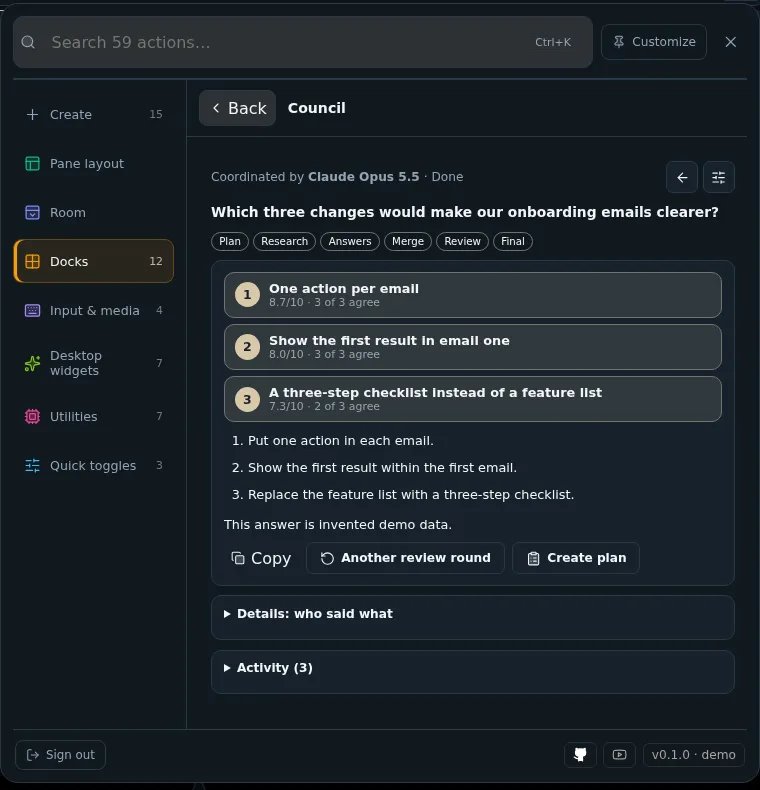
A coordinator model reads your question, asks what is missing and proposes who answers.
After your approval, each member answers on its own from the same evidence.
The positions are merged without names and every member scores them.
The coordinator writes the agreed Top 3.
Space is not another chat window. It is a system of rooms where every kind of work has its place.
Give every mission its own room — a launch, a research thread, an ops shift — so contexts never collide.
Chat with agents, attach real CLI terminals and pin browser views (large profile), all side by side.
Agents keep their context, artifacts stay within reach, and you stay in flow while the room does the heavy lifting.
Every pane in a room exists for a reason — and stays exactly where you need it.
The Room Agent watches every pane in its room and shows which ones wait for you.
Coming next Talk to it about the room, and with Auto-answer on it answers the prompts that wait for you, so the agents keep working while you are away.
Coming next: it warns when two panes change the same files, and their work joins one release train.
,%20adapted%20to%20the%20dark%20Space%20badge.%20--%3e%3csvg%20fill='%23fff'%20fill-rule='evenodd'%20viewBox='0%200%2024%2024'%20xmlns='http://www.w3.org/2000/svg'%3e%3ctitle%3eCodex%3c/title%3e%3cpath%20d='M9.205%208.658v-2.26c0-.19.072-.333.238-.428l4.543-2.616c.619-.357%201.356-.523%202.117-.523%202.854%200%204.662%202.212%204.662%204.566%200%20.167%200%20.357-.024.547l-4.71-2.759a.797.797%200%2000-.856%200l-5.97%203.473zm10.609%208.8V12.06c0-.333-.143-.57-.429-.737l-5.97-3.473%201.95-1.118a.433.433%200%2001.476%200l4.543%202.617c1.309.76%202.189%202.378%202.189%203.948%200%201.808-1.07%203.473-2.76%204.163zM7.802%2012.703l-1.95-1.142c-.167-.095-.239-.238-.239-.428V5.899c0-2.545%201.95-4.472%204.591-4.472%201%200%201.927.333%202.712.928L8.23%205.067c-.285.166-.428.404-.428.737v6.898zM12%2015.128l-2.795-1.57v-3.33L12%208.658l2.795%201.57v3.33L12%2015.128zm1.796%207.23c-1%200-1.927-.332-2.712-.927l4.686-2.712c.285-.166.428-.404.428-.737v-6.898l1.974%201.142c.167.095.238.238.238.428v5.233c0%202.545-1.974%204.472-4.614%204.472zm-5.637-5.303l-4.544-2.617c-1.308-.761-2.188-2.378-2.188-3.948A4.482%204.482%200%20014.21%206.327v5.423c0%20.333.143.571.428.738l5.947%203.449-1.95%201.118a.432.432%200%2001-.476%200zm-.262%203.9c-2.688%200-4.662-2.021-4.662-4.519%200-.19.024-.38.047-.57l4.686%202.71c.286.167.571.167.856%200l5.97-3.448v2.26c0%20.19-.07.333-.237.428l-4.543%202.616c-.619.357-1.356.523-2.117.523zm5.899%202.83a5.947%205.947%200%20005.827-4.756C22.287%2018.339%2024%2015.84%2024%2013.296c0-1.665-.713-3.282-1.998-4.448.119-.5.19-.999.19-1.498%200-3.401-2.759-5.947-5.946-5.947-.642%200-1.26.095-1.88.31A5.962%205.962%200%200010.205%200a5.947%205.947%200%2000-5.827%204.757C1.713%205.447%200%207.945%200%2010.49c0%201.666.713%203.283%201.998%204.448-.119.5-.19%201-.19%201.499%200%203.401%202.759%205.946%205.946%205.946.642%200%201.26-.095%201.88-.309a5.96%205.96%200%20004.162%201.713z'%20/%3e%3c/svg%3e) Codex
Codex.%20--%3e%3csvg%20viewBox='0%200%2024%2024'%20xmlns='http://www.w3.org/2000/svg'%3e%3ctitle%3eClaude%3c/title%3e%3cpath%20d='M4.709%2015.955l4.72-2.647.08-.23-.08-.128H9.2l-.79-.048-2.698-.073-2.339-.097-2.266-.122-.571-.121L0%2011.784l.055-.352.48-.321.686.06%201.52.103%202.278.158%201.652.097%202.449.255h.389l.055-.157-.134-.098-.103-.097-2.358-1.596-2.552-1.688-1.336-.972-.724-.491-.364-.462-.158-1.008.656-.722.881.06.225.061.893.686%201.908%201.476%202.491%201.833.365.304.145-.103.019-.073-.164-.274-1.355-2.446-1.446-2.49-.644-1.032-.17-.619a2.97%202.97%200%2001-.104-.729L6.283.134%206.696%200l.996.134.42.364.62%201.414%201.002%202.229%201.555%203.03.456.898.243.832.091.255h.158V9.01l.128-1.706.237-2.095.23-2.695.08-.76.376-.91.747-.492.584.28.48.685-.067.444-.286%201.851-.559%202.903-.364%201.942h.212l.243-.242.985-1.306%201.652-2.064.73-.82.85-.904.547-.431h1.033l.76%201.129-.34%201.166-1.064%201.347-.881%201.142-1.264%201.7-.79%201.36.073.11.188-.02%202.856-.606%201.543-.28%201.841-.315.833.388.091.395-.328.807-1.969.486-2.309.462-3.439.813-.042.03.049.061%201.549.146.662.036h1.622l3.02.225.79.522.474.638-.079.485-1.215.62-1.64-.389-3.829-.91-1.312-.329h-.182v.11l1.093%201.068%202.006%201.81%202.509%202.33.127.578-.322.455-.34-.049-2.205-1.657-.851-.747-1.926-1.62h-.128v.17l.444.649%202.345%203.521.122%201.08-.17.353-.608.213-.668-.122-1.374-1.925-1.415-2.167-1.143-1.943-.14.08-.674%207.254-.316.37-.729.28-.607-.461-.322-.747.322-1.476.389-1.924.315-1.53.286-1.9.17-.632-.012-.042-.14.018-1.434%201.967-2.18%202.945-1.726%201.845-.414.164-.717-.37.067-.662.401-.589%202.388-3.036%201.44-1.882.93-1.086-.006-.158h-.055L4.132%2018.56l-1.13.146-.487-.456.061-.746.231-.243%201.908-1.312-.006.006z'%20fill='%23D97757'%20fill-rule='nonzero'%20/%3e%3c/svg%3e) Claude Code
Claude Code Gemini
%202025%20opencode.%20--%3e%3csvg%20width='300'%20height='300'%20viewBox='0%200%20300%20300'%20fill='none'%20xmlns='http://www.w3.org/2000/svg'%3e%3cg%20transform='translate(30,%200)'%3e%3cg%20clip-path='url(%23opencode-square-clip)'%3e%3cmask%20id='opencode-square-mask'%20style='mask-type:luminance'%20maskUnits='userSpaceOnUse'%20x='0'%20y='0'%20width='240'%20height='300'%3e%3cpath%20d='M240%200H0V300H240V0Z'%20fill='white'/%3e%3c/mask%3e%3cg%20mask='url(%23opencode-square-mask)'%3e%3cpath%20d='M180%20240H60V120H180V240Z'%20fill='%234B4646'/%3e%3cpath%20d='M180%2060H60V240H180V60ZM240%20300H0V0H240V300Z'%20fill='%23F1ECEC'/%3e%3c/g%3e%3c/g%3e%3c/g%3e%3cdefs%3e%3cclipPath%20id='opencode-square-clip'%3e%3crect%20width='240'%20height='300'%20fill='white'/%3e%3c/clipPath%3e%3c/defs%3e%3c/svg%3e) OpenCode
OpenCode Autohand Code
 Qwen Code
.%20--%3e%3csvg%20viewBox='0%200%2024%2024'%20xmlns='http://www.w3.org/2000/svg'%3e%3ctitle%3eKimi%3c/title%3e%3cpath%20d='M21.846%200a1.923%201.923%200%20110%203.846H20.15a.226.226%200%2001-.227-.226V1.923C19.923.861%2020.784%200%2021.846%200z'%20fill='%231783FF'%20/%3e%3cpath%20d='M11.065%2011.199l7.257-7.2c.137-.136.06-.41-.116-.41H14.3a.164.164%200%2000-.117.051l-7.82%207.756c-.122.12-.302.013-.302-.179V3.82c0-.127-.083-.23-.185-.23H3.186c-.103%200-.186.103-.186.23V19.77c0%20.128.083.23.186.23h2.69c.103%200%20.186-.102.186-.23v-3.25c0-.069.025-.135.069-.178l2.424-2.406a.158.158%200%2001.205-.023l6.484%204.772a7.677%207.677%200%20003.453%201.283c.108.012.2-.095.2-.23v-3.06c0-.117-.07-.212-.164-.227a5.028%205.028%200%2001-2.027-.807l-5.613-4.064c-.117-.078-.132-.279-.028-.381z'%20fill='%23fff'%20/%3e%3c/svg%3e) Kimi Code
Kimi Code,%20adapted%20to%20the%20dark%20Space%20badge.%20--%3e%3csvg%20fill='%23fff'%20fill-rule='evenodd'%20viewBox='0%200%2024%2024'%20xmlns='http://www.w3.org/2000/svg'%3e%3ctitle%3eGrok%3c/title%3e%3cpath%20d='M6.469%208.776L16.512%2023h-4.464L2.005%208.776H6.47zm-.004%207.9l2.233%203.164L6.467%2023H2l4.465-6.324zM22%202.582V23h-3.659V7.764L22%202.582zM22%201l-9.952%2014.095-2.233-3.163L17.533%201H22z'%20/%3e%3c/svg%3e) Grok Build
Grok Build DeepSeek
 Cursor
%20--%3e%3csvg%20xmlns='http://www.w3.org/2000/svg'%20width='24'%20height='24'%20viewBox='0%200%2024%2024'%3e%3cpath%20d='M23.922%2016.992c-.861%201.495-5.859%205.023-11.922%205.023-6.063%200-11.061-3.528-11.922-5.023A.641.641%200%200%201%200%2016.736v-2.869a.841.841%200%200%201%20.053-.22c.372-.935%201.347-2.292%202.605-2.656.167-.429.414-1.055.644-1.517a10.195%2010.195%200%200%201-.052-1.086c0-1.331.282-2.499%201.132-3.368.397-.406.89-.717%201.474-.952%201.399-1.136%203.392-2.093%206.122-2.093%202.731%200%204.767.957%206.166%202.093.584.235%201.077.546%201.474.952.85.869%201.132%202.037%201.132%203.368%200%20.368-.014.733-.052%201.086.23.462.477%201.088.644%201.517%201.258.364%202.233%201.721%202.605%202.656a.832.832%200%200%201%20.053.22v2.869a.641.641%200%200%201-.078.256ZM12.172%2011h-.344a4.323%204.323%200%200%201-.355.508C10.703%2012.455%209.555%2013%207.965%2013c-1.725%200-2.989-.359-3.782-1.259a2.005%202.005%200%200%201-.085-.104L4%2011.741v6.585c1.435.779%204.514%202.179%208%202.179%203.486%200%206.565-1.4%208-2.179v-6.585l-.098-.104s-.033.045-.085.104c-.793.9-2.057%201.259-3.782%201.259-1.59%200-2.738-.545-3.508-1.492a4.323%204.323%200%200%201-.355-.508h-.016.016Zm.641-2.935c.136%201.057.403%201.913.878%202.497.442.544%201.134.938%202.344.938%201.573%200%202.292-.337%202.657-.751.384-.435.558-1.15.558-2.361%200-1.14-.243-1.847-.705-2.319-.477-.488-1.319-.862-2.824-1.025-1.487-.161-2.192.138-2.533.529-.269.307-.437.808-.438%201.578v.021c0%20.265.021.562.063.893Zm-1.626%200c.042-.331.063-.628.063-.894v-.02c-.001-.77-.169-1.271-.438-1.578-.341-.391-1.046-.69-2.533-.529-1.505.163-2.347.537-2.824%201.025-.462.472-.705%201.179-.705%202.319%200%201.211.175%201.926.558%202.361.365.414%201.084.751%202.657.751%201.21%200%201.902-.394%202.344-.938.475-.584.742-1.44.878-2.497Z'/%3e%3cpath%20d='M14.5%2014.25a1%201%200%200%201%201%201v2a1%201%200%200%201-2%200v-2a1%201%200%200%201%201-1Zm-5%200a1%201%200%200%201%201%201v2a1%201%200%200%201-2%200v-2a1%201%200%200%201%201-1Z'/%3e%3c/svg%3e) GitHub Copilot
GitHub Copilot Hermes
 Oh My Pi
 Qoder
Qoder Muse Code
 Droid
DroidCodex, Claude Code, Gemini, OpenCode, Autohand Code, Qwen Code, Kimi Code, Grok Build, DeepSeek, Cursor, GitHub Copilot, Hermes, Oh My Pi, Qoder, Muse Code, and Droid share one governed operating layer: the same skills library, approved MCP server catalog and canonical memory, delivered through each runtime’s supported integration path.
Canonical memory uses a Room, Project and System taxonomy with tags, provenance, lifecycle states and audited change sets. Deterministic Greek/English TF-IDF topic vectors and cosine-similarity relationships connect related knowledge.
Inside Space, an Obsidian-style knowledge graph powered by Graphology, Sigma and ForceAtlas2 provides clustered and relationship views without leaving the app. Common History preserves operational continuity across all sixteen CLI runtimes.
Sixteen panes per room, one-click presets, and warm rooms that keep every session alive between switches.
11 installable CLI runtimes, with four focused starter panes, correct branding, shared history, and runtime-aware controls.
Live Chrome panes with tabs, device viewports, evidence capture, and one-click operator handoff (large profile).
Private clipboard history and a media dock for the files your agents produce.
Join the real build sessions, follow new features as they land, and ask questions while Space takes shape. The latest YouTube livestream appears here automatically.

Click anywhere to start video directly
These run on the maker's own SpaceApp today. They are not in the public release yet; each card says when to expect it. What shipped so far is in the release notes.
Client work on freelance platforms, proposals under a send check.
Coming nextThe Room Agent warns when two panes change the same files; work joins one release train.
Coming nextScreenshots and short videos of your own workspace in device and social sizes.
Coming nextTokens per model, provider and account, with their API value.
Coming nextOne mind for your whole space: it watches every room and brings you only the decisions that need you.
Coming nextOne gateway for your model accounts.
Coming nextSpaceApp notifications on your Android phone.
Coming nextEvery release of the public installer, run-spaceapp, is on npm and in the release notes.
SpaceApp and the run-spaceapp launcher move to the MIT License, OpenCode 2 is the first CLI, backup saves the database, files, memory and workflow history from one moment, a failed restore puts every database and file back, and dependency security updates.
Team accounts with a CLI container per user (off until the owner runs user enable), Codex sandboxing where the host allows it, install telemetry only after the owner's Yes, and session, WebSocket Origin and framing hardening.
Security hardening: other local sites cannot use your session, child processes no longer receive the session secret, and optional modules start off on new installs.
CLI panes start in their own room workspace, an update notice with a Copy button, first prompts in the setup wizard, and opt-in first-answer telemetry.
The first OpenCode task no longer stops at a scratch-directory permission prompt, and guided setup works on every screen size.
The first free OpenCode model is checked with a real tool call, with Big Pickle tried first.
The install wizard respects the telemetry answer (the default is No), and small-profile installs no longer roll back.
SpaceApp runs on your own machine. The AI providers you connect receive what you send them, under their own terms.
Open source, copyright INTRATRADE SINGLE MEMBER P.C. Use, copy, modify, distribute and sell it, including self-hosting and commercial use, as long as the copyright and licence notice stay with it. Read the LICENSE.
The install wizard lists what is sent and asks; the default is No. With Yes, a random install ID links the install, setup and first-answer events and at most one activity event a day; no files, prompts or credentials. Security & privacy guide.
Install once. Connect your AI.
Start building from wherever you are.
Small profile: 4 CPUs, 7 GiB RAM and 6.5 GiB free disk. Browser panes need the large profile: 8 CPUs, 15 GiB RAM and 11 GiB free disk. Node.js 20.11+ is required; the launcher installs Docker if it is missing. OpenCode is the first CLI in setup.
To continue from another device, connect to the same reachable host. Keep that host running. Phones and tablets access your workspace; they do not run the Docker installer.
Run directly in Command Prompt, Terminal or Bash with npx — no global installation required. First-time account registration, password resets, automatic health checks, and lifecycle management.
SpaceApp is a super agent app for building with AI. Start with a conversation, then bring your agents, tools, files, previews, plans and shared memory into the same space. Use as much of it as you need.
Yes, once your installation is reachable from them. By default SpaceApp listens only on its own host; to use it from a phone, tablet or another computer, give it a reachable address with TLS and a firewall (see Remote & mobile access in the docs). The host must stay on.
SpaceApp is free to self-host. Bring your own AI accounts or API keys; provider subscriptions and usage are separate.
SpaceApp is open source under the MIT License, copyright INTRATRADE SINGLE MEMBER P.C. You may use, copy, modify, distribute and sell it, including self-hosting and commercial use, as long as the copyright and licence notice stay with it. The LICENSE file on GitHub has the full terms. Read the LICENSE ↗
No. Start with one conversation or one agent, and add providers and accounts as your work grows. The setup starts with OpenCode; you choose what to connect next.
No. The copilot panes are optional modules, and new installs start with none of them; you turn one on with optionalModules in the launcher's config.json and npx --yes run-spaceapp@latest repair. Their agents' tools are not part of the public release yet: the copilots work on the maker's own SpaceApp today.
Everything on this page without a label is in the current public release. A card marked “Coming in” a version arrives with that release; a card marked “Coming next” runs on the maker's own SpaceApp and is not public yet.
Your workspace runs on your own installation. Connected AI and external services process the information you send to them under their own policies.
Only if you say yes. The install wizard lists what is sent and asks; the default is No. With Yes, a new install gets a random install ID that links its events: the install (OS, CPU, RAM, profile, versions), owner setup, the first CLI and the first answer, and at most one activity event a day (screen size, browser, UI language, version). No files, prompts, answers or credentials are sent, and the IP address is not stored. Nothing is sent with No.
Yes. The live demo runs in your browser with local demo data and no account; it does not contact AI providers or a real installation. When you like it, install your own workspace.
A paid pilot for software and AI teams of 3–15 developers who already use AI coding CLIs. We install SpaceApp for each developer on their own machine, using your own API keys.
CLIs in the pilot: OpenCode and Claude Code. Other CLIs are added when they pass a task on your install during setup.
MIT licensed: no licence fee. See the security boundaries.
Questions, feedback or the workspace your team needs. We’ll reply personally.
Prefer live community chat?
Join DiscordSpaceApp is a product of INTRATRADE SINGLE MEMBER P.C., Patras, Greece · GEMI 180769616000 · VAT EL802678365